

When users click an element and the site hangs, that delay is measured as First Input Delay (FID). A sluggish FID often stems from unoptimized JavaScript in themes, plugins or third-party scripts.
To improve FID, focus on deferring, delaying, or removing JavaScript, hosting resources locally and eliminating unused code. Apply these 14 steps to optimize your WordPress site.
1. Find Large JavaScript Files
Open the Coverage tool in Chrome DevTools to identify the largest JavaScript files loaded by your theme, plugins, or external services.

2. Host Third-Party JavaScript Locally
Host Google Fonts, analytics and other third-party scripts locally to reduce external HTTP requests and improve load times.

3. Delay Remaining Third-Party Code
Delay non-critical third-party scripts using plugins like Perfmatters, Flying Scripts or WP Rocket so they load after initial user interaction.
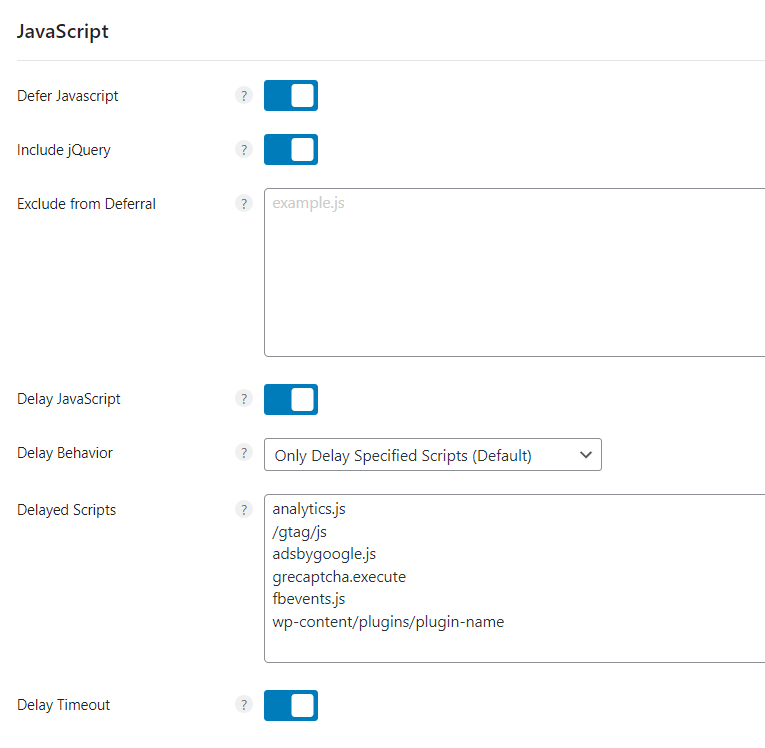
4. Defer JavaScript
Defer JavaScript loading to make it non-render-blocking. Exclude any files that break functionality.

5. Unload Unused Scripts
Use asset-unloading plugins like Perfmatters or Asset Cleanup to disable CSS and JavaScript on pages where they aren’t needed.

6. Lazy Render HTML Elements
Lazy render comments, footers or other below-the-fold elements to reduce initial blocking time.

7. Remove jQuery-Dependent Plugins
Audit and remove plugins that rely on jQuery to avoid extra JS dependencies that slow down FID.

8. Avoid Bloated Themes and Page Builders
Switch to lightweight themes like GeneratePress or Astra instead of heavy page builders such as Elementor or Divi.
9. Activate Page Builder Optimizations
If you must use a page builder, enable its asset optimization features to reduce JS and CSS payloads.

10. Don’t Use Page Builders for Header/Footer
Code global site elements with CSS instead of using page builders for headers, footers or sidebars to cut down on repetitive scripts.

11. Minify JavaScript
Enable JavaScript minification in your cache plugin to shrink file sizes. Exclude files if they break functionality.

12. Remove Unused CSS
Use plugins like Perfmatters or FlyingPress to remove unused CSS. Avoid WP Rocket’s inline method, which increases HTML size.

13. Use Brotli Compression
Enable Brotli on your server to compress files more efficiently than Gzip, reducing download times.

14. Use a CDN with Full Page Caching
Leverage a high-performance CDN like QUIC.cloud or Cloudflare with APO to lower global latency and improve FID.

Implement these steps to significantly boost First Input Delay and deliver a faster, more responsive WordPress site.