

Introduction
Looking for the perfect set of SEO tools for your WordPress site? This guide covers 22 essential plugins—beyond Yoast and Rank Math—into areas like schema, redirects, image alt text, table of contents, and page speed. Keep your site organized, in-depth, and optimized for Core Web Vitals.
Plugin Checklist
- Rank Math
- SEOPress
- Schema Pro
- Structured Content
- LuckyWP Table of Contents
- Automatic Image Alt Attributes
- Google Site Kit
- Republish Old Posts
- Broken Link Checker
- Quick Page/Post Redirect
- ShortPixel
- WP Rocket
- Asset CleanUp
- Speed Optimization Plugins
- Rel Nofollow Checkbox
- Yoast Premium Plugins
- Analytify
- Really Simple SSL
- Better Search Replace
- Anti-Spam
- WP Google My Business Auto Publish
- StudioPress Plugins
1. Rank Math
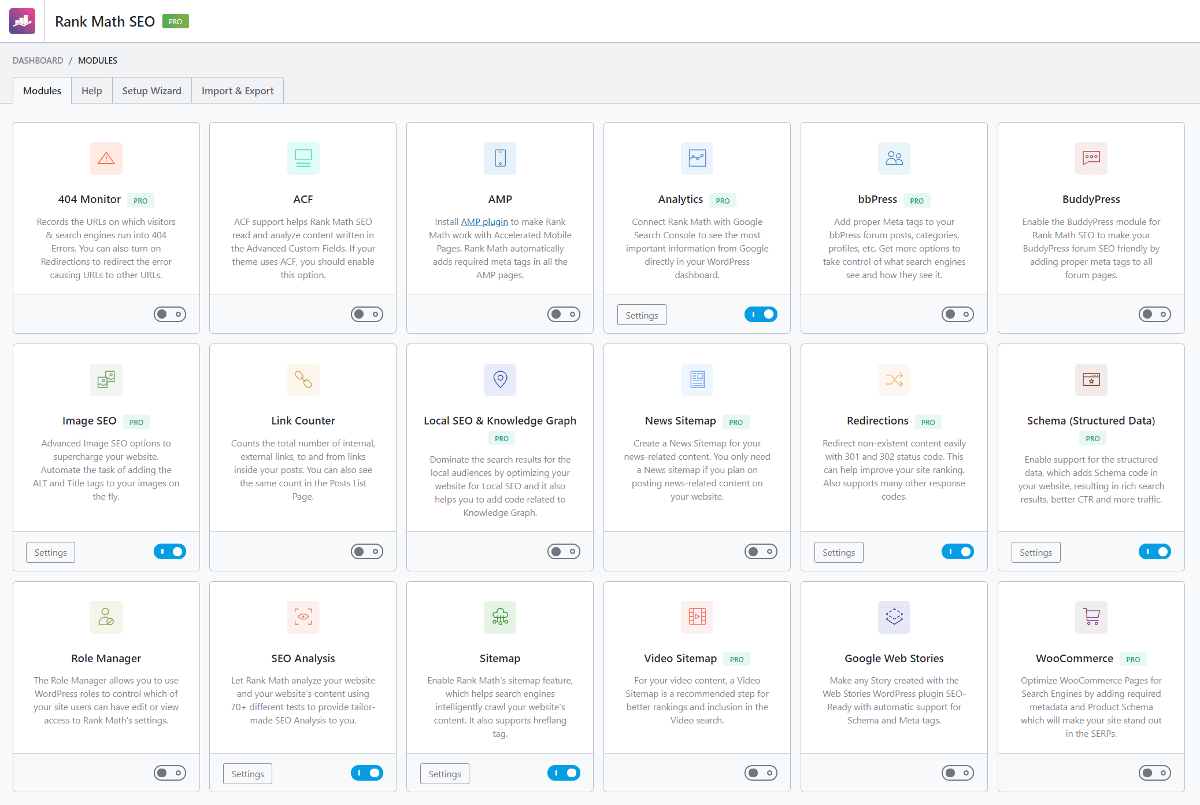
Rank Math offers a lightweight, feature-rich alternative to Yoast with nearly half the code and a free suite matching many premium tools.
- Minimal bloat for faster loading.
- Built-in automatic image alt text and advanced schema support.
- Easy migration wizard from other SEO plugins.
- Detailed analytics integration with Google Search Console.
2. SEOPress
SEOPress is popular among Oxygen Builder users and offers both free and premium editions with features such as structured data, 404 monitoring, and redirections.
3. Schema Pro
Developed by Brainstorm Force, Schema Pro reliably implements all major structured data types and stays up to date with Google’s requirements.
4. Structured Content
A free, easy solution for adding FAQ schema to your posts and pages to enhance search result listings.
5. LuckyWP Table of Contents
This plugin auto-generates a linked table of contents from subheadings, improving user navigation and earning jump-to links from Google.
6. Automatic Image Alt Attributes
Automatically applies alt text based on image filenames, saving time and boosting accessibility.
7. Google Site Kit
Integrate Search Console, Analytics, PageSpeed Insights, and more directly into your WordPress dashboard.
8. Republish Old Posts
Refreshes post dates to keep content looking current and improve click-through rates—use responsibly.
9. Broken Link Checker
Scans your site for broken links and lets you edit or remove them directly within WordPress.
10. Quick Page/Post Redirect
Simple interface to set up 301 redirects when you change page or post URLs.
11. ShortPixel
Compress images losslessly, strip EXIF data, and optimize new uploads for faster page loads.
12. WP Rocket
Industry-leading caching plugin that also handles lazy loading, database cleanup, and CDN integration.
13. Asset CleanUp
Disable unused CSS and JavaScript per page to reduce requests and speed up your site.
14. Speed Optimization Plugins
Combine tools like lazy loading, heartbeat control, AMP, local font hosting, and query monitoring to achieve top Core Web Vitals scores.
15. Rel Nofollow Checkbox
Add a nofollow option directly in the link dialog for affiliate or external links.
16. Yoast Premium Plugins
Yoast’s premium extensions cover redirects, local SEO, video SEO, and news sitemaps—but many features overlap with free alternatives.
17. Analytify
Display Google Analytics data in your dashboard with intuitive charts and real-time stats.
18. Really Simple SSL
Automatically detects SSL settings and configures mixed content fixes and redirections.
19. Better Search Replace
Bulk update URLs, image paths, or any text in your database when moving domains or changing protocols.
20. Anti-Spam
Lightweight, captcha-free comment spam protection to keep your discussions clean and SEO-friendly.
21. WP Google My Business Auto Publish
Automatically post your WordPress content to your Google My Business listing to improve local SEO signals.
22. StudioPress Plugins
Lightweight, reliable plugins designed for the Genesis framework to maintain performance and reduce conflicts.
Conclusion
Choose the plugins that address your site’s specific needs—whether it’s rich snippets, performance, or content structure—and keep them updated. The right combination can help you outrank competitors and deliver a faster, more engaging user experience.