

Introduction
Based on common SEO challenges and the latest Google updates, this guide outlines 31 proven tactics to improve your WordPress site’s rankings, performance, and user experience.
1. Choose a Lightweight Theme
Avoid bulky page builders like Elementor or Divi. Opt for fast themes such as GeneratePress, Astra, Oxygen, or Kadence to reduce CSS/JS bloat and improve Core Web Vitals.
2. Install a Powerful SEO Plugin
Rank Math, SEOPress, and Yoast are top choices. Configure XML sitemaps, schema markup, open graph data, and noindex rules for archives and author pages.
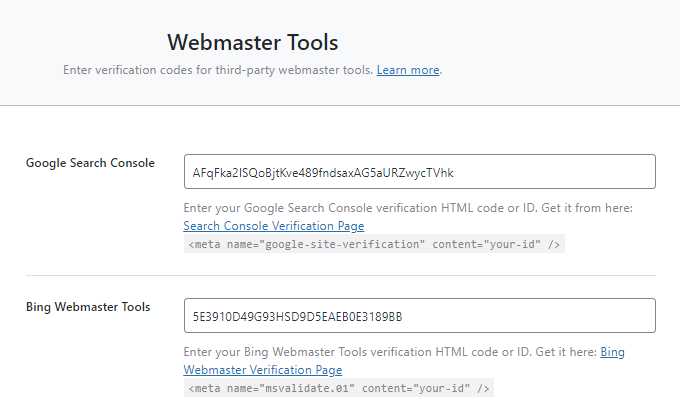
3. Set Up Google Search Console
Verify your site, submit your sitemap, and use the URL Inspection tool. Monitor drops in rankings, clicks, CTR, page experience, mobile usability, schema errors, and Core Web Vitals.
4. Conduct Keyword Research
Use Google Autocomplete and Keywords Everywhere to find long-tail phrases with moderate search volume and low competition. Validate keyword difficulty by analyzing top-ranking pages.
5. Add Keywords Strategically
Place your focus keyword in the post title, SEO title, meta description, permalink, and a few times in the opening paragraphs. Do not over-optimize or stuff.
6. Don’t Obsess Over Green Lights
SEO scores in plugins are only guidelines. Write naturally and focus on readability rather than perfect plugin indicators.
7. Include a Table of Contents
A TOC helps users navigate long articles, encourages featured snippets, and provides jump-to links. Use a plugin like LuckyWP Table Of Contents or manual HTML anchors.
8. Target Featured Snippets
Structure concise definitions, numbered lists, or tables at the top. Include a clear answer to common questions in 40–60 words, and optimize images with descriptive file names and alt text.
9. Craft Compelling SEO Titles
Use numbers and power words, front-load keywords, and stay within character limits. A strong title boosts click-through rates in search results.
10. Write Effective Meta Descriptions
Although Google often rewrites them, a well-written snippet can still improve engagement. Include your keyword and a clear call to action.
11. Implement Schema Markup
Use Rank Math, Schema Pro, or Google Data Highlighter to add structured data for articles, FAQs, reviews, and more. Test with Google’s Structured Data Testing Tool.
12. Optimize Images
Label files descriptively, set accurate alt text, compress files, lazy-load images, and serve them in next-gen formats via a CDN.
13. Use High-Quality Graphics
Design branded featured images and infographics with tools like Canva. Consistent visuals enhance shares and featured snippet attempts.
14. Embed Multimedia
Include videos, infographics, and charts. Embedding YouTube videos increases dwell time and cross-platform engagement.
15. Optimize Social Sharing
Create custom Open Graph images (1200×630px) and Twitter cards (2:1 ratio). Configure these in your SEO plugin’s Social settings.
16. Aim for In-Depth Content
Longer posts (2,000–3,000+ words) tend to rank better—if they add real value. Research top competitors and cover missing topics.
17. Refine Domain and Permalinks
- Use HTTPS
- Strip category bases
- Choose a memorable domain
- Set “Post name” permalinks
- Avoid dates and unnecessary stop words
18. Fix Broken Links
Scan with Dr. Link Check or the Broken Link Checker plugin, then update or remove dead URLs.
19. Balance Internal and External Links
Link to your own relevant articles and authoritative external sources to support your content and signal context to Google.
20. Add rel=”nofollow” and rel=”sponsored” to Affiliate Links
Comply with Google’s guidelines by marking paid or affiliate links correctly to avoid penalties.
21. Noindex Low-Value Pages
Noindex archives, tags, paginated pages, and search results to conserve crawl budget and prevent thin-content issues.
22. Enhance Your About Page
A compelling author or company bio builds trust with readers and search engines. Highlight your credentials, story, and unique personality.
23. Update Old Content Regularly
Refresh articles with new statistics, additional sections, fresh examples, and updated graphics. Display modified dates to signal freshness.
24. Highlight Cornerstone Content
Identify your most important tutorials or guides. Link to them prominently in menus, sidebars, or a dedicated hub page.
25. Monitor Core Web Vitals
Use Search Console and PageSpeed Insights to fix LCP, CLS, and FID issues by optimizing images, fonts, and JavaScript loading.
26. Stay Ahead of Core Algorithm Updates
Follow @searchliaison on Twitter for announcements, and prepare in advance by maintaining quality content and performance best practices.
27. Check Mobile and Browser Compatibility
Test your site on multiple devices and browsers to catch errors caused by WebP, CSS, or JS incompatibilities.
28. Follow Affiliate Marketing Best Practices
Provide genuine value rather than pushy sales pitches. Write unbiased reviews, diversify topics, and use affiliate links sparingly.
29. Optimize for Local SEO
Claim and optimize your Google My Business listing, build local citations, gather reviews, and create geo-targeted landing pages.
30. Implement YouTube SEO
Research video keywords with YouTube Autocomplete and VidIQ. Create longer videos, add chapters, optimize titles/descriptions, and embed them on your blog.
31. WooCommerce SEO
Write compelling product titles and descriptions, optimize category pages, compress images, and disable unnecessary WooCommerce scripts on non-selling pages.
Frequently Asked Questions
- Best WordPress SEO plugin? Rank Math, SEOPress, and Yoast are top picks—many switch to Rank Math for its rich feature set.
- Is WordPress good for SEO? Yes, especially with a lightweight theme and a solid SEO plugin.
- How do I SEO my WordPress site? Install an SEO plugin, perform keyword research, and publish in-depth, well-optimized content.
- Less obvious tips? Add a table of contents, display modified dates, and avoid keyword stuffing for green plugin lights.